
Traefik Tutorial: Route Traffic Without the Config Pain
Quick answer
Traefik is a reverse proxy that sits in front of your services and routes each request to the right one, based on rules you write once. Instead of editing a web server config and reloading it every time a service moves, you tell Traefik where your services live and it picks the routes up on its own. This post runs a small shop site behind it and fixes the 404 that catches beginners.
A shop in Karachi takes orders through a small website. Today the site is one Python process on one port, and the address bar shows a port number nobody will remember. Tomorrow a second service arrives and needs its own address without its own public port. A reverse proxy solves that: one front door, and the proxy decides which service gets each request from the hostname in it. NGINX has done this job for years, but every new service means editing a config file and reloading the server. Traefik watches a provider instead and builds its routes from there.
What I would check before using it
My first check is how many services sit behind the front door. One static site on one server does not need a dynamic router; NGINX or Caddy is simpler there. Once there are three or four services, the hand-edited config becomes the thing you dread touching. My judgement: pick Traefik when the service list moves, and skip it when it never changes.
My second check is the provider. Traefik learns about services from a provider, and Docker is the one most people use, because containers appear and disappear and Traefik notices without being told. This demo uses the file provider instead, because the shop has no Docker: one small YAML file lists the router and service. If every service is a fixed config file anyway, discovery buys little. The NGINX Explained: The Server in Front of Your Server post covers the static approach, and the Docker Explained: Containers Without the Confusion post covers the container side.
My third check is the dashboard and TLS. Traefik ships a dashboard and an API that show every router and service live, which makes debugging far easier. The insecure dashboard used here is for a local demo only: never expose it on a public port without authentication. Traefik can also fetch TLS certificates automatically, but it needs a real domain and port 443. The Caddy Web Server Tutorial: Serve a Shop Site in Minutes post shows another server that handles certificates for you.
My verdict, as judgement: use Traefik when several services change, especially with Docker, and keep NGINX or Caddy for one service that rarely moves. The recommendation flips if no one on the team is comfortable reading router rules, because a miswritten rule fails silently with a 404.
Four orders behind one reverse proxy
The demo is a small shop site: a Python backend on port 18001 serves a shop page and an orders list with four real orders, Sana and Hamza in Karachi, Daniyal in Lahore, Mahnoor in Islamabad. Traefik listens on port 18080 and forwards requests to it. Port 8080 was taken on this machine, so the demo uses 18080, with the dashboard and API on 18081.
The static config, traefik.yml:
entryPoints:
  web:
    address: ":18080"
  traefik:
    address: ":18081"

api:
  dashboard: true
  insecure: true

providers:
  file:
    filename: dynamic.yml
    watch: true

log:
  level: INFO
The dynamic config, dynamic.yml, holds the routing: one router for Host shop.localhost, one service for the backend:
http:
  routers:
    shop:
      rule: "Host(`shop.localhost`)"
      entryPoints:
        - web
      service: shop-service
  services:
    shop-service:
      loadBalancer:
        servers:
          - url: "http://127.0.0.1:18001"
Start the backend first, then Traefik:
$ python3 shop.py &
$ ./traefik --configfile=traefik.yml &
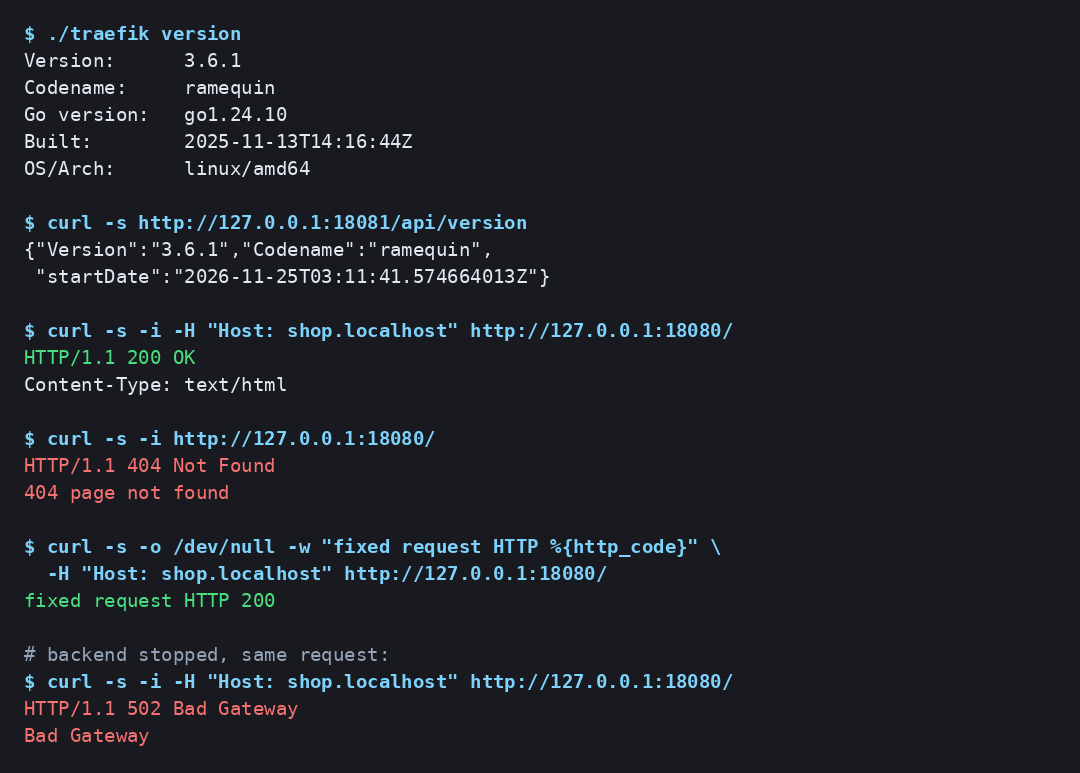
The API confirms the version, and the dashboard answers:
$ curl -s http://127.0.0.1:18081/api/version
{"Version":"3.6.1","Codename":"ramequin","startDate":"2026-11-25T03:11:41.574664013Z"}
$ curl -s -o /dev/null -w "dashboard HTTP %{http_code}\n" http://127.0.0.1:18081/dashboard/
dashboard HTTP 200
Now the shop page, through Traefik, with the right Host header:
$ curl -s -i -H "Host: shop.localhost" http://127.0.0.1:18080/
HTTP/1.1 200 OK
Content-Length: 166
Content-Type: text/html
Date: Wed, 25 Nov 2026 03:11:44 GMT
Server: BaseHTTP/0.6 Python/3.12.3

<html><body><h1>Karachi Corner Shop</h1>
<p>Four orders, three cities, one small shop.</p>
<p>See <a href="/orders">/orders</a> for the order list.</p>
</body></html>
The orders list comes through the same way:
$ curl -s -H "Host: shop.localhost" http://127.0.0.1:18080/orders
[
  {
    "id": 101,
    "customer": "Sana",
    "city": "Karachi",
    "items": [
      "kurta",
      "dupatta"
    ],
    "total": 9800
  },
  {
    "id": 102,
    "customer": "Daniyal",
    "city": "Lahore",
    "items": [
      "sneakers"
    ],
    "total": 13400
  },
  {
    "id": 103,
    "customer": "Mahnoor",
    "city": "Islamabad",
    "items": [
      "handbag",
      "wallet"
    ],
    "total": 11200
  },
  {
    "id": 104,
    "customer": "Hamza",
    "city": "Karachi",
    "items": [
      "jacket",
      "shalwar kameez"
    ],
    "total": 6750
  }
]
Then the thing that went wrong: the same request without the Host header. curl sends Host: 127.0.0.1:18080 by default, and no router matches it, so Traefik answers the 404 itself:
$ curl -s -i http://127.0.0.1:18080/
HTTP/1.1 404 Not Found
Content-Type: text/plain; charset=utf-8
X-Content-Type-Options: nosniff
Date: Wed, 25 Nov 2026 03:11:44 GMT
Content-Length: 19

404 page not found
The fix is one header:
$ curl -s -o /dev/null -w "fixed request HTTP %{http_code}\n" -H "Host: shop.localhost" http://127.0.0.1:18080/
fixed request HTTP 200
A second failure looks different. Stop the backend and the same request returns a 502: Traefik is up and the service is not. Restart it and the 200 returns:
$ curl -s -i -H "Host: shop.localhost" http://127.0.0.1:18080/
HTTP/1.1 502 Bad Gateway
Date: Wed, 25 Nov 2026 03:13:39 GMT
Content-Length: 11

Bad Gateway
A 404 means no router matched. A 502 means the router matched but the service is down. Knowing which one saves the hour you would spend fixing the wrong half.
Common mistakes and how to fix them
First, requesting without the right Host header. The symptom is a "404 page not found" with the backend running, because curl sends Host: 127.0.0.1:18080 and no router matches that host. The fix is to send the Host the router expects, with -H "Host: shop.localhost", or add a PathPrefix rule instead.
Second, the dashboard or API answering 404. The symptom is /api/version returning "404 page not found" while the proxy works: the API is served on the entrypoint named traefik, and my first run named it something else. The fix is to name that entrypoint traefik.
Third, Traefik refusing to start with "address already in use". The symptom is an error like "listen tcp :8080: bind: address already in use" and Traefik exits at once. The fix is a free port, 18080 here, after checking what listens with ss -ltnp.
Fourth, a 502 Bad Gateway when the backend stops. The symptom is "Bad Gateway" with the backend gone: Traefik is up and the service is not. The fix is to restart the backend and check the service URL points at a live port.
Frequently Asked Questions
Is Traefik a replacement for NGINX? For routing between services, yes, and it is the easier choice when services appear and disappear. NGINX stays the right call for a single static site the team already knows.
Do I need Docker to use Traefik? No. The Docker provider is the most popular one, but the file provider used here works on any server: a small YAML file lists routers and services.
Why does Traefik return 404 when my service is running? Usually because no router rule matches the request. Check the Host header first, then the rule, then the dashboard.
Is it safe to leave the dashboard on? Not on a public port without authentication. The insecure dashboard here is for local testing only, so put it behind authentication or turn it off in production.
What to remember
- Traefik routes by rules, usually the Host header, and a request that matches no rule gets a 404.
- The static config opens the entrypoints and picks the providers; the dynamic config defines routers and services.
- The file provider works without Docker, and Traefik watches the file.
- A 404 means no router matched; a 502 means the router matched but the service is down.
- The dashboard and API live on the entrypoint named traefik, and the insecure dashboard is for local use only.
Where this leaves you
Traefik earns its place the moment the front door has more than one service behind it. The demo proved the shape of it: two small config files, one router, one service, and a shop page and four real orders flowing through the proxy. The 404 was not a broken backend, it was a Host header the router did not expect, and the 502 was not a broken proxy, it was a backend that had stopped. Learn to tell those two apart, and the next routing problem will take minutes instead of an afternoon.
Further reading
- Traefik documentation
- Traefik file provider
- Traefik routers
- NGINX Explained: The Server in Front of Your Server
- Caddy Web Server Tutorial: Serve a Shop Site in Minutes
- Docker Explained: Containers Without the Confusion
- Build Your First REST API With Node.js and Express
- Redis Explained: The In-Memory Store That Speeds Things Up
Waqas Shahid is a software engineer from Karachi with more than 12 years of experience, including 6+ years in engineering leadership. He writes The Practical Developer.
Comments
Join the discussionNo comments yet. Be the first to comment.