
Docusaurus Tutorial: Docs Your Shop Can Actually Ship
Quick answer
Docusaurus turns Markdown files into a fast docs website with search, navigation, and versioning built in. It is built on React, so a team that already knows React can shape it, and it produces plain static files you can host anywhere. This post scaffolds a real site for a small shop, adds an orders page with five real orders totalling Rs 57,500, and shows a broken link failing the build before the fix.
Your shop's how-to knowledge lives in three places: a WhatsApp group, a notebook behind the counter in Karachi, and the head of whoever trained the last hire. A customer asks how to change a paid order, and the answer depends on who picks up the phone. A new staff member in Lahore guesses, and the warehouse packs the wrong version. The fix is not another chat group. It is one docs site everyone can open, one page per question, with a build that refuses to ship a broken link. Docusaurus gives you that site from plain Markdown files, and this post builds it for a real shop.
What I would check before using it
My first check is who writes the docs. Docusaurus pages are Markdown files in a folder, so anyone who can write a message can write a docs page. If your team writes in Word and will not touch a text file, the tool will sit empty. The Markdown Explained: Writing That Becomes Any Format post covers the format your writers need first.
My second check is custom design. Docusaurus ships a clean default theme with a sidebar, search, and dark mode, plenty for a shop docs site. If the docs must match a brand pixel for pixel, you will fight the theme, and a React framework like Gatsby Explained: React Sites With Data From Anywhere gives you more room.
My third check is versioning. Docusaurus versions docs, so last season's price list stays readable while the current one moves on. That matters when branches run different price lists. MkDocs Tutorial: Turn Markdown Into a Real Docs Site is lighter and quicker to start, and Eleventy Static Site Tutorial: Build a Fast Shop Site is lighter still, but neither versions docs like Docusaurus.
My verdict, as judgement: adopt Docusaurus when a small team needs versioned docs with search and a sidebar, in Markdown, hosted as static files. The recommendation flips if you have a single short page of notes, because one HTML page is enough, or if nobody on the team will write Markdown, because the best tool is the one your writers actually open.
A shop docs site, built and shipped, with one broken link along the way
The demo is a docs site for a small clothing and homeware shop with branches in Karachi, Lahore, and Islamabad. It has one real page, the orders page, listing five orders and the four states an order moves through. Scaffolding takes one command.
$ npx create-docusaurus@latest shop-docs classic --typescript --skip-install
...
We recommend that you begin by typing:

  `cd shop-docs`
  `npm start`

Happy building awesome websites!
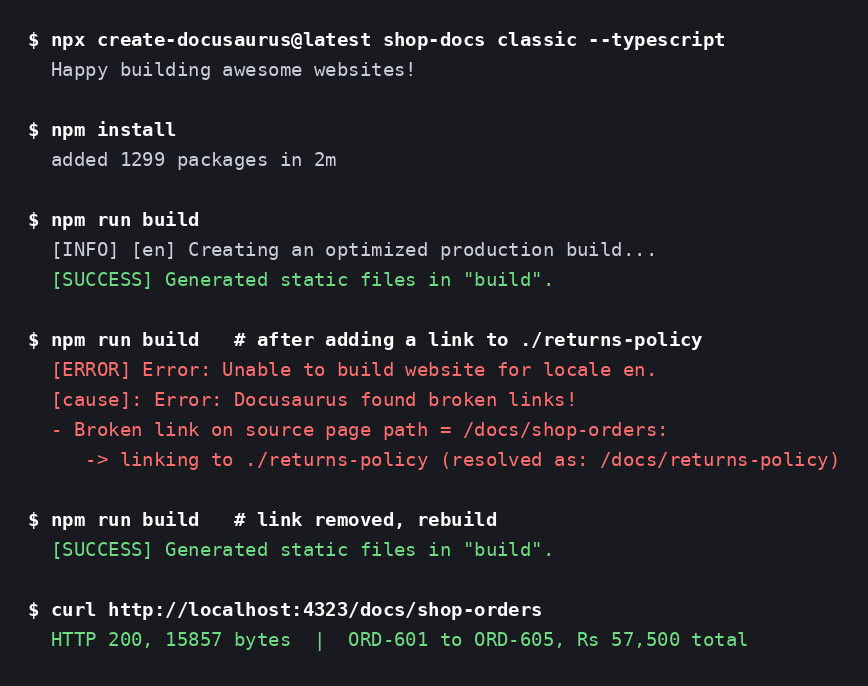
Then the dependencies, 1,299 packages in about two minutes, and the orders page, a Markdown file with a table of the five orders:
$ npm install
added 1299 packages in 2m
# How shop orders work

| Order | Customer | City | Items | Total |
|-------|----------|------|-------|-------|
| ORD-601 | Sana | Karachi | Cotton kurti, lawn dupatta | Rs 12,400 |
| ORD-602 | Daniyal | Lahore | Leather wallet, belt | Rs 9,750 |
| ORD-603 | Mahnoor | Islamabad | Tea set, serving tray | Rs 15,800 |
| ORD-604 | Hamza | Karachi | Sneakers, socks | Rs 8,300 |
| ORD-605 | Ayesha | Lahore | Handbag, scarf | Rs 11,250 |
The totals check out: Karachi Rs 20,700, Lahore Rs 21,000, Islamabad Rs 15,800, a grand total of Rs 57,500. Now the build:
$ npm run build
[INFO] [en] Creating an optimized production build...
[SUCCESS] Generated static files in "build".
[INFO] Use `npm run serve` command to test your build locally.
The build succeeded: 29 HTML files in a 2.2M build folder. The first build also printed a harmless warning about the update notifier config store, a sandbox permissions quirk. Serving the site locally returned HTTP 200.
Now the thing that goes wrong: a line was added pointing at a returns policy page that does not exist yet, and the build was run again:
See also our [returns policy](./returns-policy) for refunds.
$ npm run build
[INFO] [en] Creating an optimized production build...
[ERROR] Error: Unable to build website for locale en.
  [cause]: Error: Docusaurus found broken links!

  Exhaustive list of all broken links found:
  - Broken link on source page path = /docs/shop-orders:
     -> linking to ./returns-policy (resolved as: /docs/returns-policy)
The build failed with exit code 1, because the default config sets onBrokenLinks to throw. That is the behaviour you want: a dead link stops the deploy. The fix is to remove the link until the returns page exists, then rebuild:
$ npm run build
[INFO] [en] Creating an optimized production build...
[SUCCESS] Generated static files in "build".
[INFO] Use `npm run serve` command to test your build locally.
The rebuild passed, and the five orders still total Rs 57,500. A docs site that refuses to build with a broken link is one your customers can trust.
Common mistakes and how to fix them
First, linking to a page that does not exist yet. The symptom is a build that fails with "Docusaurus found broken links!" and names the page. The fix is to create the page first, or remove the link until the page exists, and leave onBrokenLinks on throw.
Second, editing the files inside build/ instead of the Markdown source. The symptom is changes that vanish on the next build, because build/ is output, not source. The fix is to edit the files under docs/ and rebuild.
Third, putting a page outside the docs folder and wondering why it never appears. The symptom is a page that builds nowhere, or a sidebar that never lists it. The fix is to keep every doc under docs/; the autogenerated sidebar picks up new files on the next build.
Fourth, deploying the project folder instead of the build folder. The symptom is a live site that serves raw Markdown and config files, or a blank page. The fix is to deploy only the contents of build/, or use npm run deploy for GitHub Pages.
Frequently Asked Questions
Is Docusaurus free? Yes. Docusaurus is open source under the MIT licence, and you run it yourself, so the only cost is hosting, often free for a small site.
Do I need to know React to use Docusaurus? Not for writing docs. Markdown pages, the sidebar, and search all work without touching React. You need React only for custom theme components.
How does Docusaurus compare with MkDocs? Docusaurus is built on React, with versioning and a blog included, while MkDocs is a lighter Python tool that starts faster. Pick MkDocs for a quick single-version manual, and Docusaurus when you need versions and search.
How do I deploy a Docusaurus site? Run npm run build, then host the build folder on any static host, like GitHub Pages, Netlify, or Vercel. The npm run deploy command publishes straight to GitHub Pages.
What to remember
- Docusaurus turns Markdown files into a docs site with search, a sidebar, and versioning.
- The build output is static files in build/, and that folder is what you deploy.
- A broken link fails the build by default: onBrokenLinks is set to throw.
- Keep every doc under docs/ so the sidebar picks it up.
- Write the page first, then link to it.
Where this leaves you
Docusaurus earns its place the moment a new hire in Lahore finds the right answer without calling Karachi. The demo built a real site from one command, added an orders page with five real orders, and proved the safety net works: a link to a missing page stopped the build, and removing it shipped the site. That is the deal Docusaurus offers, a small amount of setup for docs that stay correct. Scaffold the site, write the page your team asks about most, and let the build guard the links.
Further reading
- Docusaurus documentation
- Docusaurus deployment
- MkDocs Tutorial: Turn Markdown Into a Real Docs Site
- Eleventy Static Site Tutorial: Build a Fast Shop Site
- Markdown Explained: Writing That Becomes Any Format
- Gatsby Explained: React Sites With Data From Anywhere
- Hugo Explained: Blazing-Fast Static Sites From Go
Waqas Shahid is a software engineer from Karachi with more than 12 years of experience, including 6+ years in engineering leadership. He writes The Practical Developer.
Comments
Join the discussionNo comments yet. Be the first to comment.