
Helm Tutorial: Ship Kubernetes Apps Without the YAML Mess
Quick answer
Helm is the package manager for Kubernetes: it bundles Deployments, Services, and ConfigMaps into a chart, fills in the values from one file, and installs or upgrades the whole set with one command. A chart is templates plus a values file, and Helm renders them into plain YAML before anything reaches the cluster. This post builds a chart for a small shop orders API, renders it offline, and fixes the one missing value that stops the render.
One orders API runs in three places: a test cluster, a staging cluster, and production. The Deployment, Service, and Ingress are nearly identical each time, except replicas, image tag, and a few settings. Copying the YAML folder three times works for a week, then someone edits staging and forgets production. Editing YAML by hand means a typo only shows up when kubectl rejects it, or when a pod starts wrong. Helm covers this gap: one set of templates, one values file per environment, and a render step that shows the YAML.
What I would check before using it
My first check is whether the same app runs in more than one place with small differences. That is where Helm pays for itself: one chart, and a values file per environment. If one app runs on one cluster and the YAML rarely changes, plain kubectl apply is simpler, and Helm is extra moving parts.
My second check is who else touches the deployment. Helm charts are shareable and versioned, so a team installs the same chart with different values instead of passing YAML files around in chat. That sharing is also the risk: a chart from the internet can run anything its templates describe, so I read the templates before installing a chart I did not write.
My third check is how the app is configured. Helm shines when configuration is a short list of values: replicas, image tag, port, city, currency. If each environment needs a different Deployment shape, templates fill up with conditionals and turn harder to read than the YAML they replaced. The Kubernetes post covers the objects Helm manages, and the Terraform post covers provisioning the cluster itself.
My verdict, as judgement: adopt Helm when one app ships to several environments, or several teams install the same app with different settings. The recommendation flips with one cluster and one app, because kubectl and a folder of YAML is enough, or if nobody maintains the chart, because an unmaintained chart rots faster than plain manifests.
Packaging a shop orders API, from helm create to a clean render
The demo is a small orders API for a shop in Karachi. It takes website orders and runs as two replicas behind a ClusterIP Service on port 8080. The shop also sells in Lahore and Islamabad, so the city, region, and currency must come from values, not hardcoded text. Everything here runs offline: helm template and helm lint need no cluster.
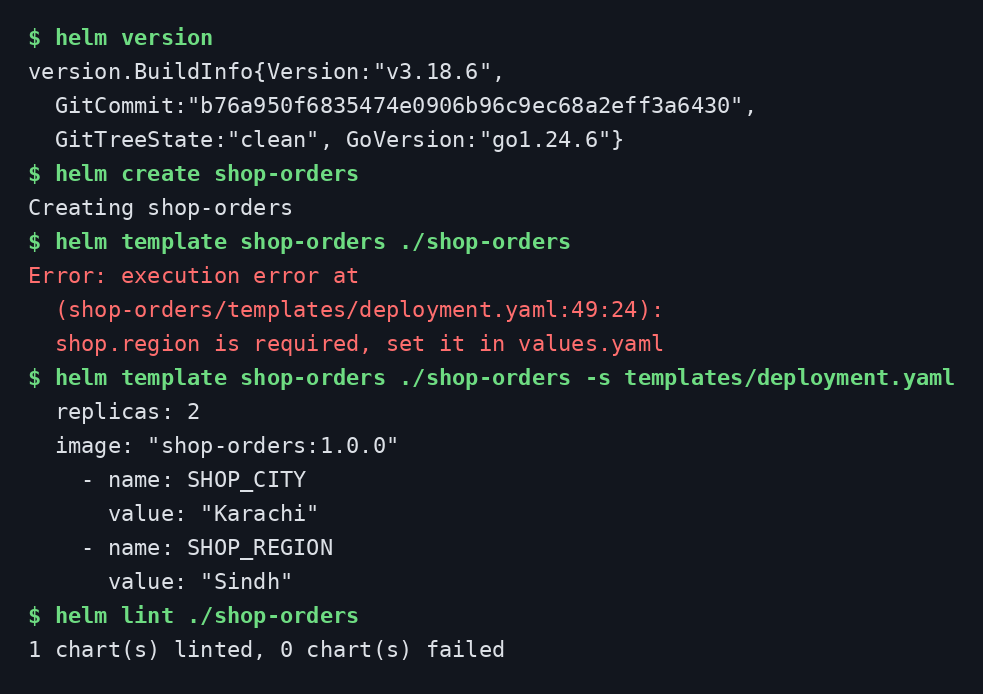
Helm ships as one binary, version 3.18.6 here, and helm create scaffolds a chart:
$ helm version
version.BuildInfo{Version:"v3.18.6", GitCommit:"b76a950f6835474e0906b96c9ec68a2eff3a6430", GitTreeState:"clean", GoVersion:"go1.24.6"}

$ helm create shop-orders
Creating shop-orders
The scaffold already has a Deployment, a Service, and a test pod. First, values.yaml: two replicas, the shop-orders image at tag 1.0.0, the Service on port 8080, and a shop block for Karachi:
replicaCount: 2

image:
  repository: shop-orders
  pullPolicy: IfNotPresent
  tag: "1.0.0"

service:
  type: ClusterIP
  port: 8080

shop:
  city: Karachi
  currency: PKR
  greeting: "Assalam-o-Alaikum, welcome to the shop"
Second, the Deployment template: three environment variables carry the shop settings into the container, and the region line uses required so a missing value fails loudly.
          env:
            - name: SHOP_CITY
              value: {{ .Values.shop.city | quote }}
            - name: SHOP_CURRENCY
              value: {{ .Values.shop.currency | quote }}
            - name: SHOP_REGION
              value: {{ required "shop.region is required, set it in values.yaml" .Values.shop.region | quote }}
Now the render, the step that catches mistakes before they reach a cluster, and it catches one immediately:
$ helm template shop-orders ./shop-orders
Error: execution error at (shop-orders/templates/deployment.yaml:49:24): shop.region is required, set it in values.yaml

Use --debug flag to render out invalid YAML
The error names the file and line, deployment.yaml line 49. The values file has a city and a currency but no region. The fix is one line in values.yaml:
shop:
  city: Karachi
  region: Sindh
  currency: PKR
Run helm template again, and it renders cleanly:
$ helm template shop-orders ./shop-orders -s templates/deployment.yaml
---
# Source: shop-orders/templates/deployment.yaml
apiVersion: apps/v1
kind: Deployment
metadata:
  name: shop-orders
  ...
spec:
  replicas: 2
  ...
  template:
    spec:
      containers:
        - name: shop-orders
          image: "shop-orders:1.0.0"
          imagePullPolicy: IfNotPresent
          env:
            - name: SHOP_CITY
              value: "Karachi"
            - name: SHOP_CURRENCY
              value: "PKR"
            - name: SHOP_REGION
              value: "Sindh"
          ports:
            - name: http
              containerPort: 8080
              protocol: TCP
Two replicas, the shop-orders:1.0.0 image, and all three environment variables: SHOP_CITY Karachi, SHOP_CURRENCY PKR, SHOP_REGION Sindh. An override check: helm template with --set replicaCount=3 renders replicas: 3 without touching a file. Then helm lint passes the chart with one note, a chart icon is recommended, and helm package wraps it into shop-orders-0.1.0.tgz:
$ helm lint ./shop-orders
==> Linting ./shop-orders
[INFO] Chart.yaml: icon is recommended

1 chart(s) linted, 0 chart(s) failed

$ helm package ./shop-orders
Successfully packaged chart and saved it to: shop-orders-0.1.0.tgz
Common mistakes and how to fix them
First, referencing a value that does not exist. The symptom is a render that fails with an execution error, or a Deployment with an empty string where a setting should be. The fix is to add the value to values.yaml, pass it with --set, or guard the line with required so it fails loudly.
Second, installing without rendering first. The symptom is a helm install that fails halfway, or pods that start with the wrong image. The fix is to run helm template and read the output before installing: a render costs nothing, a rollback costs time.
Third, hardcoding settings inside templates. The symptom is a chart that works in Karachi and breaks in Lahore, because the city name sits in the Deployment, not values.yaml. The fix is to move every environment difference into values.yaml.
Fourth, reusing a release name. The symptom is the error "cannot re-use a name that is still in use". The fix is helm upgrade --install, which installs or upgrades the release.
Frequently Asked Questions
Do I need a Kubernetes cluster to learn Helm? No. Everything in this post runs offline: helm create, helm template, helm lint, and helm package need no cluster. A cluster is only needed for a real helm install.
What is the difference between a chart and a release? A chart is the package, templates plus values. A release is one installed instance of that chart, with its own name and values. The same chart can produce a Karachi release and a Lahore release with different values.
Helm or kubectl, which one should I use? kubectl applies YAML you write by hand. Helm generates that YAML from templates and values, then tracks the release so upgrades and rollbacks are one command.
Can Helm manage secrets? Not safely on its own. Values files are plain text, so passwords and keys do not belong in them. Keep secrets in your cluster secret manager and reference them from the chart.
What to remember
- Helm renders templates plus values into plain YAML, and helm template shows it before anything is installed.
- One chart serves many environments when every difference lives in values.yaml.
- required turns a missing value into a loud error at render time.
- helm lint checks the chart, and helm package wraps it into a .tgz file.
- Never put secrets in values files; they are plain text.
Where this leaves you
Helm does not replace Kubernetes, it removes the copy and paste around it. The demo chart started as a scaffold, took a few edits, failed loudly on a missing value, and rendered into a Deployment with two replicas, the right image, and the Karachi settings. That render step is the habit to keep: if the YAML looks right offline, the install has less to get wrong. Pick one app you deploy by hand today, wrap it in a chart, and render it with helm template before the next deploy.
Further reading
- Helm documentation
- Charts guide
- Using Helm
- Kubernetes Explained: How to Run Containers at Scale
- Docker Explained: Containers Without the Confusion
- Terraform Explained: Infrastructure as Code for Teams
- OpenTofu Tutorial: Infrastructure as Code, Open Source
- NGINX Explained: The Server in Front of Your Server
Waqas Shahid is a software engineer from Karachi with more than 12 years of experience, including 6+ years in engineering leadership. He writes The Practical Developer.
Comments
Join the discussionNo comments yet. Be the first to comment.