
PocketBase Tutorial: Run a Backend From One Binary
Quick answer
PocketBase is a single Go binary that gives a small app a database, an admin dashboard, user auth, file storage, and a REST API, with no separate database server to install. You download one file, run pocketbase serve, and the backend is live on your machine. This post builds a small orders backend for a shop in Karachi with four real orders, and fixes the 403 error that stops the first record.
A small shop in Karachi takes orders over the phone and writes each one in a paper notebook. The owner wants a simple backend: save an order, list the orders, total them by city. The usual route means a database, an API server, and auth to wire up and keep running: a week of setup for an afternoon job. PocketBase folds the whole stack into one file, and this post shows the full loop: start it, create a collection, save four orders, and read them back.
What I would check before using it
My first check is whether the app is a small app. PocketBase runs as one process on one server. A shop backend or a prototype fits it well. A system that needs several servers sharing one database does not, and that is where I would look at a hosted service instead. The Supabase Explained: The Open-Source Firebase Alternative post covers that side.
My second check is the database underneath. PocketBase stores everything in SQLite, one file inside the pb_data folder, so a backup is copying a file. Heavy write traffic on one file is the limit, which a small shop will never reach. The SQLite Explained: The Database That Lives Inside Your App post explains that design.
My third check is who can read and write what. A new collection starts with empty rules, which means only superusers can touch it, as the demo below shows with a real 403. That default is safe, but opening the rules for public reads is a deliberate step.
My fourth check is who runs the server. There is no monthly bill and no vendor to lock you in, but backups, updates, and uptime are your job. If nobody on the team will own that, the hosted backend in the Firebase Explained: A Backend Without Building a Backend post is the honest alternative.
My verdict, as judgement: adopt PocketBase for a small app or prototype that fits on one server. Keep a hosted backend when the app must scale across servers or nobody will own operations. The recommendation flips the moment the app outgrows a single server.
Four orders, one binary, and a 403 error
Four orders belong to one small shop: Ayesha in Karachi, Rs 12,400; Bilal in Lahore, Rs 7,800; Hina in Karachi, Rs 9,600; Usman in Islamabad, Rs 15,200. The plan: an orders collection, four records saved through the API, and a list back.
First, download the binary from the releases page. The version below is the latest at the time of writing; an older version number returns a plain 404.
$ curl -L -o pocketbase.zip https://github.com/pocketbase/pocketbase/releases/download/v0.40.6/pocketbase_0.40.6_linux_amd64.zip
$ unzip -o pocketbase.zip
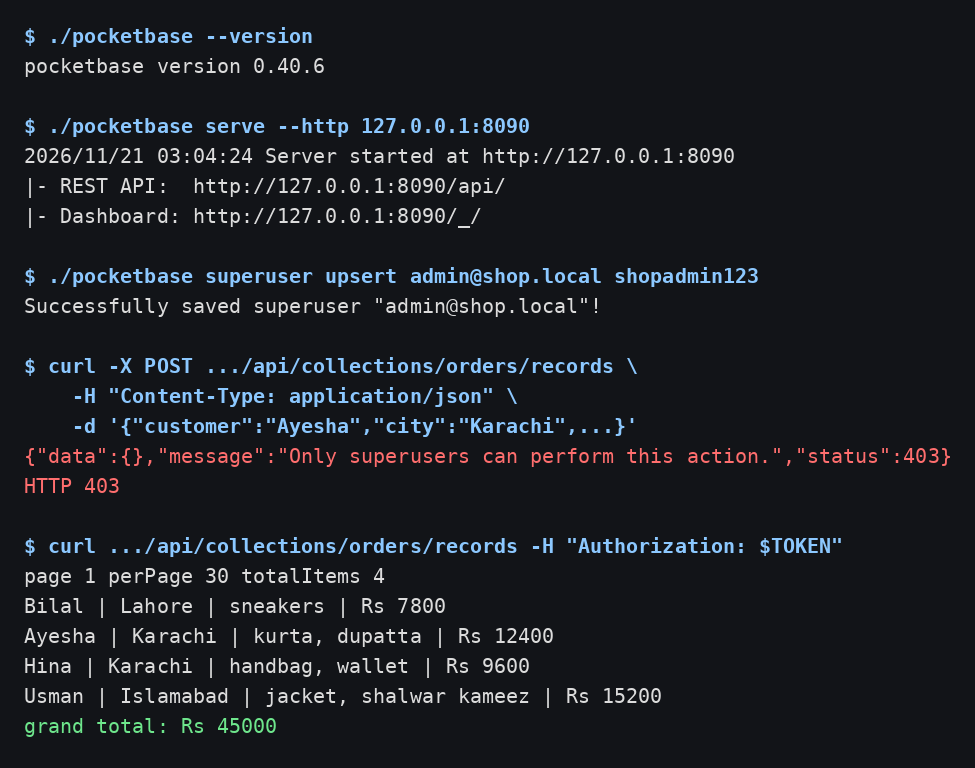
$ ./pocketbase --version
pocketbase version 0.40.6
Start the server. It listens on port 8090, and the log shows where the API and dashboard live.
$ ./pocketbase serve --http 127.0.0.1:8090
2026/11/21 03:04:24 Server started at http://127.0.0.1:8090
├─ REST API:  http://127.0.0.1:8090/api/
└─ Dashboard: http://127.0.0.1:8090/_/
Before the API accepts anything, create a superuser, the admin account for the backend.
$ ./pocketbase superuser upsert admin@shop.local shopadmin123
Successfully saved superuser "admin@shop.local"!
Log in as that superuser to get a token, and save it in a variable for the Authorization header on admin calls.
$ curl -s -X POST http://127.0.0.1:8090/api/collections/_superusers/auth-with-password \
    -H "Content-Type: application/json" \
    -d '{"identity":"admin@shop.local","password":"shopadmin123"}'
The token is saved here into TOKEN. Next, create the orders collection: city is a select with three values, and total is a number, so a wrong value is rejected.
{
  "name": "orders",
  "type": "base",
  "fields": [
    {"name": "customer", "type": "text", "required": true},
    {"name": "city", "type": "select", "required": true,
     "values": ["Karachi", "Lahore", "Islamabad"]},
    {"name": "items", "type": "text", "required": true},
    {"name": "total", "type": "number", "required": true}
  ]
}
$ curl -s -X POST http://127.0.0.1:8090/api/collections \
    -H "Authorization: $TOKEN" -H "Content-Type: application/json" \
    -d @create-collection.json
{"id":"pbc_3527180448","name":"orders","type":"base", ... "created":"2026-11-21 03:04:46.657Z"}
Here is the thing that goes wrong: creating a record without the token fails, because empty rules mean superusers only.
$ curl -s -X POST http://127.0.0.1:8090/api/collections/orders/records \
    -H "Content-Type: application/json" \
    -d '{"customer":"Ayesha","city":"Karachi","items":"kurta, dupatta","total":12400}'
{"data":{},"message":"Only superusers can perform this action.","status":403}
HTTP 403
The fix is the Authorization header with the superuser token. With it, the same request works.
$ curl -s -X POST http://127.0.0.1:8090/api/collections/orders/records \
    -H "Authorization: $TOKEN" -H "Content-Type: application/json" \
    -d '{"customer":"Bilal","city":"Lahore","items":"sneakers","total":7800}'
{"city":"Lahore","collectionId":"pbc_3527180448","collectionName":"orders","customer":"Bilal","id":"ifjpo74pv3nnvij","items":"sneakers","total":7800}
The other three records went in the same way. Listing the collection back returns all four, and the numbers check out: Karachi Rs 22,000, and the four orders add to Rs 45,000.
$ curl -s "http://127.0.0.1:8090/api/collections/orders/records" -H "Authorization: $TOKEN"
page 1 perPage 30 totalItems 4
Bilal | Lahore | sneakers | Rs 7800
Ayesha | Karachi | kurta, dupatta | Rs 12400
Hina | Karachi | handbag, wallet | Rs 9600
Usman | Islamabad | jacket, shalwar kameez | Rs 15200
grand total: Rs 45000
That is a working orders store: one binary, one data folder, a dashboard at /_/ , and a REST API the shop app can call. The FastAPI Explained: Python APIs at Full Speed post shows the same job done by building the API by hand in Python.
Common mistakes and how to fix them
First, creating a record without logging in. The symptom is HTTP 403 with the message "Only superusers can perform this action." The fix is to log in as a superuser first and send the token in the Authorization header. If the public should write, that is a rule change, not a missing header.
Second, sorting the list by created. The symptom is HTTP 400 with "Something went wrong while processing your request." when the request includes sort=created, while sort=total works. The fix is to sort by a field on the collection, such as total, or to leave the sort off.
Third, downloading a release that no longer exists. The symptom is curl saving a 9 byte file that says Not Found. The fix is to check the latest release tag first, then build the download URL from that tag.
Fourth, sending a number as a string. The symptom is silent: a total of "7800" in quotes was accepted and stored as 7800, so the record looks right while the client has a type bug. The fix is to send numbers as numbers.
Frequently Asked Questions
Does PocketBase need a separate database server? No. It stores everything in an embedded SQLite database inside the pb_data folder, so nothing else needs installing.
Is PocketBase free to use? Yes. It is open source under the MIT license, and you run it on your own server, so there is no monthly fee.
Can I use PocketBase in production? Yes, for small apps that fit on one server. Keep the pb_data folder backed up, keep the binary updated, and put the server behind HTTPS.
How is PocketBase different from Supabase or Firebase? PocketBase is a single self-hosted binary with its database built in, while Supabase and Firebase are hosted services. Self-hosting means no monthly bill and full control, but you own backups and uptime.
Does PocketBase include user auth and realtime updates? Yes. It ships with auth collections for users, including email and OAuth login, and realtime subscriptions so a client can watch records change.
What to remember
- One binary is the whole backend: database, dashboard, auth, storage, and API.
- Create a superuser first, then log in for a token.
- New collections start with empty rules: superusers only.
- No token means a 403; the fix is the Authorization header.
- Data lives in pb_data, so back up that folder.
Where this leaves you
PocketBase earns its place the afternoon a small app needs a real backend and nobody wants to spend a week building one. The demo proved the parts that matter: one binary started the server, a superuser and a token unlocked the API, the 403 made the auth rule visible instead of failing silently, and four real orders came back with a grand total of Rs 45,000. Try it on your next small project, keep the rules tight, and back up pb_data from day one.
Further reading
- PocketBase docs
- PocketBase records API
- PocketBase on GitHub
- Supabase Explained: The Open-Source Firebase Alternative
- Firebase Explained: A Backend Without Building a Backend
- SQLite Explained: The Database That Lives Inside Your App
- FastAPI Explained: Python APIs at Full Speed
Waqas Shahid is a software engineer from Karachi with more than 12 years of experience, including 6+ years in engineering leadership. He writes The Practical Developer.
Comments
Join the discussionNo comments yet. Be the first to comment.