
Typer Python CLI Tutorial: Build a Real Orders Tool
Quick answer
Typer turns a Python function into a command line tool: annotate the parameters, and Typer builds the help text, parses the arguments, and prints a clean usage error when something is missing. It comes from the same author as FastAPI, and it leans on the same ideas, type hints and validation. This post builds a small orders CLI for a shop in Karachi and shows the first error beginners hit.
A shop in Karachi takes orders over the phone and writes each one in a paper notebook. The owner wants a small tool: type an order into the terminal, list the orders at the end of the day, and see sales per city. The usual way to build that in Python is argparse, but every option needs several lines of setup. Typer removes most of that. The function signature is the interface: parameter names become options, type hints become validation, and the docstring becomes the help text.
What I would check before using it
My first check is whether the tool has more than one command. A single command with one or two flags is fine with argparse or sys.argv. The moment it grows a second command, add, list, and totals here, Typer earns its place, because each command is one decorated function instead of a block of parser setup. A plain script like the one in the Python List Comprehensions Explained post needs no CLI library at all.
My second check is who will use the tool: if other developers will run it, a clean --help screen matters, and Typer generates one from the function signature.
My third check is validation. Typer leans on type hints, so a total declared as int is rejected before the code runs when someone passes text. That is the same idea behind the Pydantic: Catch Bad Data Before It Reaches Your Database post, and the FastAPI Explained: Python APIs at Full Speed post shows the same pattern on the web side.
My fourth check is dependencies. Typer needs Python 3.8 or newer, and it pulls in Click and Rich, so a project that avoids third-party libraries should think twice.
My verdict, as judgement: use Typer for any Python tool with two or more commands, or one command with options that need validation. Keep argparse for a one-off script. The recommendation flips if the tool must run with zero third-party dependencies, or if nobody on the team is comfortable with type hints.
Four orders, three commands, and one missing argument
Four orders belong to one small shop: Ayesha in Karachi, Rs 12,400; Bilal in Lahore, Rs 7,800; Hina in Karachi, Rs 9,600; Usman in Islamabad, Rs 15,200.
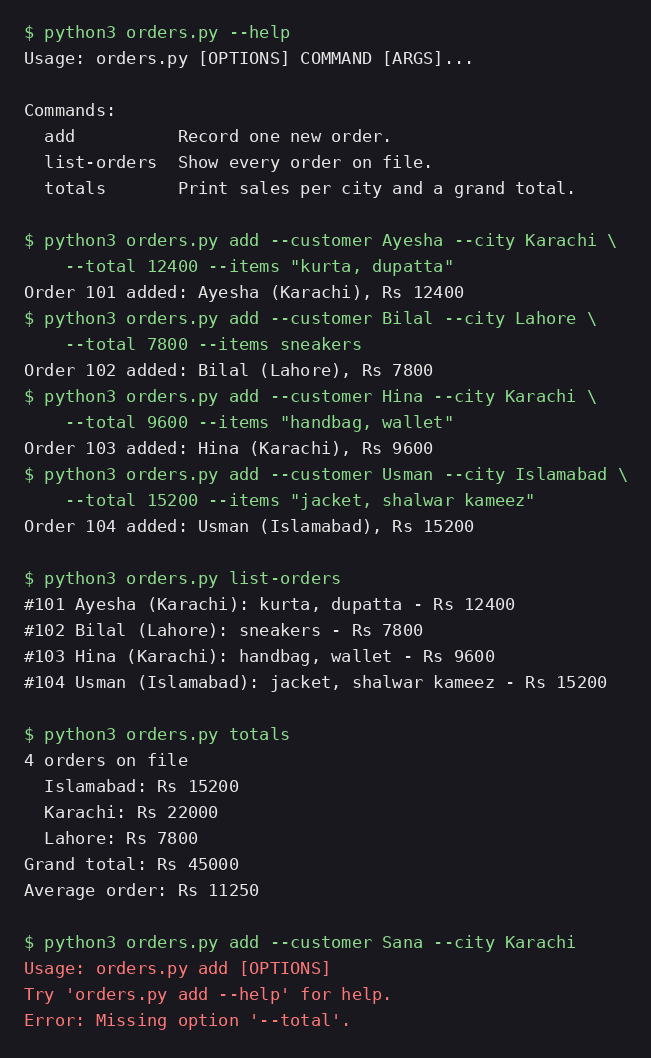
First, install Typer. The plain pip install was refused here because the system Python is externally managed, so the install used the --user flag. Running the script with --help then prints the three commands.
$ pip install --user --break-system-packages typer
Successfully installed typer-0.29.2
$ python3 orders.py --help
Usage: orders.py [OPTIONS] COMMAND [ARGS]...

Commands:
  add          Record one new order.
  list-orders  Show every order on file.
  totals       Print sales per city and a grand total.
Here is the script, which stores the orders in a JSON file next to it. Each command is a function with the @app.command() decorator, and each option is a parameter with a type hint. The add command rejects a bad total itself, while totals groups the orders per city. Typer turns the underscore in list_orders into a hyphen, so the command is list-orders.
# Orders CLI for The Practical Developer (Typer demo).
#
# A small shop in Karachi takes orders over the phone and stores
# them in a JSON file next to this script. Three commands:
#   add    - record one order
#   list-orders - show every order on file
#   totals - sales per city plus a grand total
#
# Run from this folder:
#   python3 orders.py add --customer Ayesha --city Karachi --total 12400
#   python3 orders.py list-orders
#   python3 orders.py totals
import json
from collections import defaultdict
from pathlib import Path

import typer
from typing_extensions import Annotated

app = typer.Typer(help="Track shop orders and total sales per city.")
DATA_FILE = Path(__file__).with_name("orders.json")


def load_orders() -> list[dict]:
    if DATA_FILE.exists():
        return json.loads(DATA_FILE.read_text())
    return []


def save_orders(orders: list[dict]) -> None:
    DATA_FILE.write_text(json.dumps(orders, indent=2))


@app.command()
def add(
    customer: Annotated[str, typer.Option(help="Customer name")],
    city: Annotated[str, typer.Option(help="City the order ships to")],
    total: Annotated[int, typer.Option(help="Order total in Rs (must be positive)")],
    items: Annotated[str, typer.Option(help="Comma separated items")] = "",
) -> None:
    """Record one new order."""
    if total <= 0:
        typer.echo("Error: total must be greater than 0.", err=True)
        raise typer.Exit(code=1)
    orders = load_orders()
    order_id = max((o["id"] for o in orders), default=100) + 1
    order = {
        "id": order_id,
        "customer": customer,
        "city": city,
        "items": [item.strip() for item in items.split(",") if item.strip()],
        "total": total,
    }
    orders.append(order)
    save_orders(orders)
    typer.echo(f"Order {order_id} added: {customer} ({city}), Rs {total}")


@app.command()
def list_orders() -> None:
    """Show every order on file."""
    orders = load_orders()
    if not orders:
        typer.echo("No orders yet.")
        return
    for order in orders:
        items = ", ".join(order["items"]) or "no items listed"
        typer.echo(
            f"#{order['id']} {order['customer']} ({order['city']}): "
            f"{items} - Rs {order['total']}"
        )


@app.command()
def totals() -> None:
    """Print sales per city and a grand total."""
    orders = load_orders()
    by_city: dict[str, int] = defaultdict(int)
    for order in orders:
        by_city[order["city"]] += order["total"]
    grand_total = sum(by_city.values())
    typer.echo(f"{len(orders)} orders on file")
    for city in sorted(by_city):
        typer.echo(f"  {city}: Rs {by_city[city]}")
    typer.echo(f"Grand total: Rs {grand_total}")
    if orders:
        typer.echo(f"Average order: Rs {grand_total // len(orders)}")


if __name__ == "__main__":
    app()
Now add the four orders.
$ python3 orders.py add --customer Ayesha --city Karachi --total 12400 --items "kurta, dupatta"
Order 101 added: Ayesha (Karachi), Rs 12400
$ python3 orders.py add --customer Bilal --city Lahore --total 7800 --items sneakers
Order 102 added: Bilal (Lahore), Rs 7800
$ python3 orders.py add --customer Hina --city Karachi --total 9600 --items "handbag, wallet"
Order 103 added: Hina (Karachi), Rs 9600
$ python3 orders.py add --customer Usman --city Islamabad --total 15200 --items "jacket, shalwar kameez"
Order 104 added: Usman (Islamabad), Rs 15200
The numbers check out: Karachi Rs 12,400 plus Rs 9,600 is Rs 22,000, and the four orders add to Rs 45,000.
$ python3 orders.py list-orders
#101 Ayesha (Karachi): kurta, dupatta - Rs 12400
#102 Bilal (Lahore): sneakers - Rs 7800
#103 Hina (Karachi): handbag, wallet - Rs 9600
#104 Usman (Islamabad): jacket, shalwar kameez - Rs 15200

$ python3 orders.py totals
4 orders on file
  Islamabad: Rs 15200
  Karachi: Rs 22000
  Lahore: Rs 7800
Grand total: Rs 45000
Average order: Rs 11250
The thing that went wrong was forgetting an option: add without --total stops before any code runs, prints a usage error naming the missing option, and exits with code 2. The fix is to add the missing option, or give the parameter a default value so Typer treats it as optional. A wrong type fails the same way: --total abc gave "Invalid value for '--total': Input should be a valid integer, unable to parse string as an integer", and a negative total gave "Error: total must be greater than 0." with exit code 1.
Common mistakes and how to fix them
First, forgetting a required option. The symptom is the usage error "Missing option '--total'." with exit code 2, exactly as the demo showed. The fix is to add the option, or give the parameter a default value so it becomes optional.
Second, passing text where a number belongs. The symptom is "Invalid value for '--total': Input should be a valid integer, unable to parse string as an integer", also with exit code 2. The fix is to pass a number, or change the parameter type to str and check it inside the function.
Third, calling the command by its function name. The symptom is "No such command 'list_orders'. Did you mean 'list-orders'?" with exit code 2, because Typer turns underscores into hyphens. The fix is to use the hyphenated name, or pass an explicit name like @app.command("list").
Fourth, running the script from the wrong folder. The symptom is list-orders printing "No orders yet." even though orders were added earlier, because orders.json lives next to the script. The fix is to cd into the folder holding orders.py first.
Frequently Asked Questions
Is Typer the same as Click? No. Typer is built on top of Click and adds type hints: a normal function with annotated parameters becomes a command with help text, parsing, and validation.
Does Typer replace argparse? For most small tools, yes. argparse ships with Python and needs no install, but every option takes several lines of setup, while Typer gives you the same options from the function signature.
Can Typer validate data the way Pydantic does? It uses the same ideas, and it depends on Pydantic under the hood: a parameter typed as int rejects text before your code runs.
Do I need FastAPI to use Typer? No. The two libraries share an author and a style, but they are independent.
Can I turn a Typer script into a real installed command? Yes. Add a console script entry point in pyproject.toml and install the package; the command then works from any folder.
What to remember
- A Typer command is a Python function with type hints; the signature is the interface.
- @app.command() turns the function into a command, and the docstring becomes its help text.
- Typer converts underscores in function names to hyphens in command names.
- A missing required option fails with exit code 2 and names the option.
- A wrong type is rejected before your code runs, with a clear error message.
Where this leaves you
Typer earns its place the day a Python script grows a second command and the argparse setup starts to outweigh the logic. The demo proved it: the help text came free from the function signatures, four real orders went in with one short command each, and the missing --total option failed loudly with exit code 2 instead of writing a broken order to the file. Take a script you already run from the terminal and give it one Typer command. A tool that explains itself beats a script only its author can run.
Further reading
- Typer docs
- Typer on PyPI
- Typer on GitHub
- Click docs
- Python List Comprehensions Explained
- FastAPI Explained: Python APIs at Full Speed
- Pydantic: Catch Bad Data Before It Reaches Your Database
- Python Decorators Explained: Small Wrappers, Big Behaviour Changes
- uv Python Tutorial: Manage Projects Without the Mess
Waqas Shahid is a software engineer from Karachi with more than 12 years of experience, including 6+ years in engineering leadership. He writes The Practical Developer.
Comments
Join the discussionNo comments yet. Be the first to comment.